The vacuum cleaner does not start
Issue
- The vacuum cleaner does not start
- The vacuum cleaner suddenly stopped working
- The vacuum cleaner turns itself off
Applies to
- Vacuum Canister Bagged
- Vacuum Canister Bagless
- Cordless Stick Vacuum
Solution
Possible causes:
- The brush roll, nozzle, or hose is blocked
- Filters need cleaning/changing
- The dust bag/container is full
- The vacuum cleaner might be overheated
- The battery is empty (the last LED blinks)
- Wiring problems
- Defective model
Here are a few things you can check to try and solve:
- Disconnect the vacuum cleaner from the mains. If the vacuum cleaner stops suddenly, the filters should be checked to make sure that they are not blocked or that they require changing. This applies to both bagged and bagless models. Also, check if the nozzle or hose is blocked.
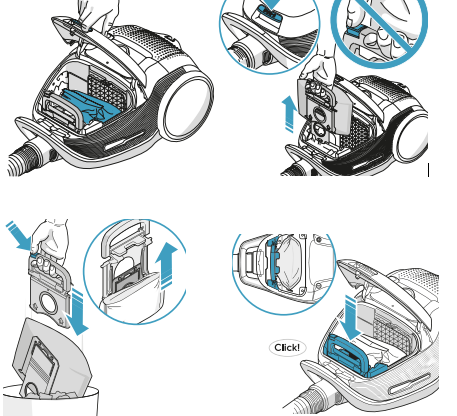
- Bagged Models, replace the S-bag if necessary, a red LED alerts you when the S-bag is full and must be changed.
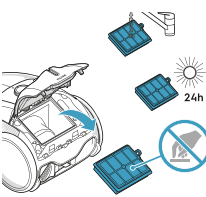
Check the Hepa hygiene filter is clean and clear. Replace if damaged or cannot be washed clean.
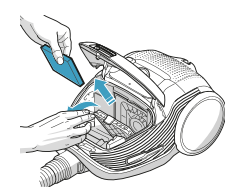
4. Check the Motor filter - if clogged or dirty - replace the filter.
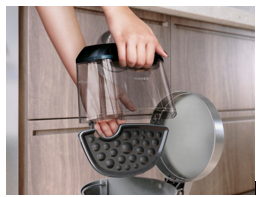
Check and empty the dust bin (bagless models)
- Fully charge the vacuum cleaner (cordless vacuum cleaners only)
You can purchase new filter and s-bags in our Webshop.
Contact an Authorized Service Centre.
If the above steps don't resolve the issue, we recommend contacting an Authorized Service Center.
Electrolux Book a Service
Was this article helpful?
Related Articles
- The vacuum cleaner stops
- Cannot use app features - UltimateHome 700 Robotic Vacuum + Mop
- Not Emptying into the Dust Bag – UltimateHome 700 Robotic Vacuum- Mop
- Empty Station Dustbin troubleshooting - UltimateHome 800 Cordless Handstick Vacuum with Clean Station
- Stick vacuum cleaner has reduced or no suction power
- Power display (3 LED lights) flash three times before turning off - UltimateHome 700 Wet & Dry Vacuum
- Wi-fi Onboarding and Loss of Connection – Trouble shooting Robot Vacuum
- Electrolux | UltimateHome 300 robot vacuum How to set up video
- What can I do if the robotic vacuum wheel(s) is stopped?
- What can I do if the robotic vacuum's bumper gets stuck - Pure I9
Related Articles
- The vacuum cleaner stops
- Cannot use app features - UltimateHome 700 Robotic Vacuum + Mop
- Not Emptying into the Dust Bag – UltimateHome 700 Robotic Vacuum- Mop
- Empty Station Dustbin troubleshooting - UltimateHome 800 Cordless Handstick Vacuum with Clean Station
- Stick vacuum cleaner has reduced or no suction power
- Power display (3 LED lights) flash three times before turning off - UltimateHome 700 Wet & Dry Vacuum
- Wi-fi Onboarding and Loss of Connection – Trouble shooting Robot Vacuum
- Electrolux | UltimateHome 300 robot vacuum How to set up video
- What can I do if the robotic vacuum wheel(s) is stopped?
- What can I do if the robotic vacuum's bumper gets stuck - Pure I9