What can I do if the robotic vacuum wheel(s) is stopped?
Issue
- What can I do if the robotic vacuum wheel(s) is stopped?
Applies to
- Robot Vacuum
Solution
Something may be obstructing the robotic vacuum wheel(s), clean below areas:
Front wheels:
- Remove any entangled threads from the main wheels so that they can turn freely.
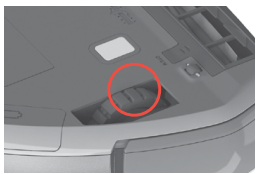
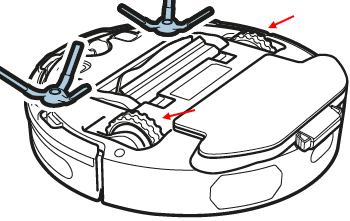
Small wheels:
Remove them carefully by using a small screwdriver and clean the wheels.
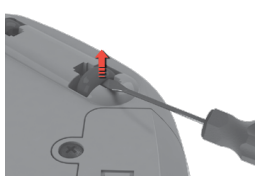
For more information consult your user manual.
Contact an Authorized Service Centre.
If the above steps don't resolve the issue, we recommend contacting an Authorized Service Center.
Was this article helpful?
Related Articles
- The vacuum cleaner stops
- Cannot use app features - UltimateHome 700 Robotic Vacuum + Mop
- Not Emptying into the Dust Bag – UltimateHome 700 Robotic Vacuum- Mop
- Empty Station Dustbin troubleshooting - UltimateHome 800 Cordless Handstick Vacuum with Clean Station
- Stick vacuum cleaner has reduced or no suction power
- Power display (3 LED lights) flash three times before turning off - UltimateHome 700 Wet & Dry Vacuum
- Wi-fi Onboarding and Loss of Connection – Trouble shooting Robot Vacuum
- Electrolux | UltimateHome 300 robot vacuum How to set up video
- What can I do if the robotic vacuum's bumper gets stuck - Pure I9
- How to set up the UltimateHome 700 Robotic Vacuum + Mop
Related Articles
- The vacuum cleaner stops
- Cannot use app features - UltimateHome 700 Robotic Vacuum + Mop
- Not Emptying into the Dust Bag – UltimateHome 700 Robotic Vacuum- Mop
- Empty Station Dustbin troubleshooting - UltimateHome 800 Cordless Handstick Vacuum with Clean Station
- Stick vacuum cleaner has reduced or no suction power
- Power display (3 LED lights) flash three times before turning off - UltimateHome 700 Wet & Dry Vacuum
- Wi-fi Onboarding and Loss of Connection – Trouble shooting Robot Vacuum
- Electrolux | UltimateHome 300 robot vacuum How to set up video
- What can I do if the robotic vacuum's bumper gets stuck - Pure I9
- How to set up the UltimateHome 700 Robotic Vacuum + Mop