The S-bag® indicator light is illuminated
Issue
- The S-bag indicator light is illuminated
- Suction power is reduced, do I need to change the bag?
- When to change the bag?
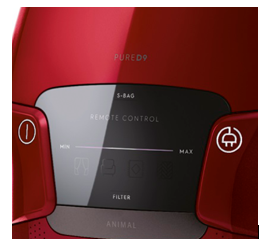
- The "S-bag" indicator is lit in white when vacuum cleaner operates
- The S-bag indicator turns red
- Immediately after switching on the appliance, the white S-bag indicator light comes on, even though the bag is new and clean
Applies to
- Vacuum Canister Bagged Models
Solution
Please note that in some models the indicator can illuminate in two colours:
- White / green (or inactive - model depending) - the vacuum cleaner is operating normally and no bag change is needed.
- Red - the bag is full and needs to be replaced.
After replacing the bag, the lamp lights up red for about 5 seconds and then continues to light up in white.
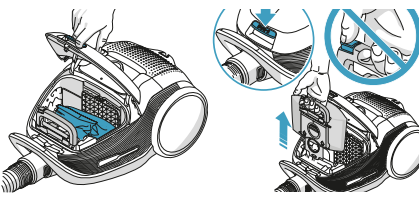
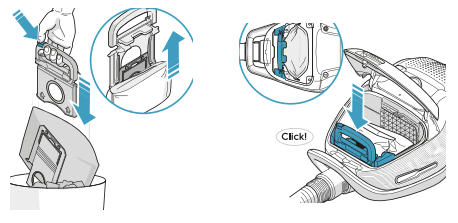
Use only Electrolux original synthetic s-bags®.
See the whole range of available replacement S-bags for your vacuum cleaner:
You can purchase new bags in our Webshop.
Was this article helpful?
Related Articles
- The vacuum cleaner stops
- Cannot use app features - UltimateHome 700 Robotic Vacuum + Mop
- Not Emptying into the Dust Bag – UltimateHome 700 Robotic Vacuum- Mop
- Empty Station Dustbin troubleshooting - UltimateHome 800 Cordless Handstick Vacuum with Clean Station
- Stick vacuum cleaner has reduced or no suction power
- Power display (3 LED lights) flash three times before turning off - UltimateHome 700 Wet & Dry Vacuum
- Wi-fi Onboarding and Loss of Connection – Trouble shooting Robot Vacuum
- Electrolux | UltimateHome 300 robot vacuum How to set up video
- What can I do if the robotic vacuum wheel(s) is stopped?
- What can I do if the robotic vacuum's bumper gets stuck - Pure I9
Related Articles
- The vacuum cleaner stops
- Cannot use app features - UltimateHome 700 Robotic Vacuum + Mop
- Not Emptying into the Dust Bag – UltimateHome 700 Robotic Vacuum- Mop
- Empty Station Dustbin troubleshooting - UltimateHome 800 Cordless Handstick Vacuum with Clean Station
- Stick vacuum cleaner has reduced or no suction power
- Power display (3 LED lights) flash three times before turning off - UltimateHome 700 Wet & Dry Vacuum
- Wi-fi Onboarding and Loss of Connection – Trouble shooting Robot Vacuum
- Electrolux | UltimateHome 300 robot vacuum How to set up video
- What can I do if the robotic vacuum wheel(s) is stopped?
- What can I do if the robotic vacuum's bumper gets stuck - Pure I9