Robotic vacuum doesn’t charge or doesn't seem to finish charging Pure I9
Issue
- Robotic vacuum doesn’t charge or doesn't seem to finish charging
Applies to
- Robot Vacuum
- Pure I9
- PI91-5SGM
- PI92-6STN
- PI92-6SGMKIT
Solution
If the robotic vacuum doesn’t charge or doesn't seem to finish charging, please refer to the following:
1. The power cord and adapter are not properly assembled, and/or connected to the mains.
- Connect the adapter connector to the charging base. Connect the power cable to the mains.
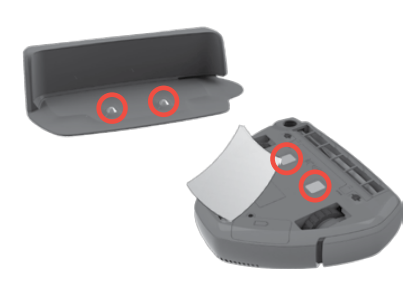
2. The charging plates on the appliance and the charging base are not connected.
- Make sure that the charging base and the appliance stand on an even surface and the charging plates on the appliance and the charging base stand are connected.
3. Ensure that the plug and cable are not damaged.
4. Clean the charging pads both on the appliance and the charger with a dry cloth.
For more information consult your user manual.
Electrolux User Manual
To purchase replacement accessories, please visit the Electrolux Webshop
Contact an Authorized Service Centre.
If the above steps don't resolve the issue, we recommend contacting an Authorized Service Center.
AEG Book a Service
Electrolux Book a Service
Was this article helpful?
Related Articles
- The vacuum cleaner stops
- Cannot use app features - UltimateHome 700 Robotic Vacuum + Mop
- Not Emptying into the Dust Bag – UltimateHome 700 Robotic Vacuum- Mop
- Empty Station Dustbin troubleshooting - UltimateHome 800 Cordless Handstick Vacuum with Clean Station
- Stick vacuum cleaner has reduced or no suction power
- Power display (3 LED lights) flash three times before turning off - UltimateHome 700 Wet & Dry Vacuum
- Wi-fi Onboarding and Loss of Connection – Trouble shooting Robot Vacuum
- Electrolux | UltimateHome 300 robot vacuum How to set up video
- What can I do if the robotic vacuum wheel(s) is stopped?
- What can I do if the robotic vacuum's bumper gets stuck - Pure I9
Related Articles
- The vacuum cleaner stops
- Cannot use app features - UltimateHome 700 Robotic Vacuum + Mop
- Not Emptying into the Dust Bag – UltimateHome 700 Robotic Vacuum- Mop
- Empty Station Dustbin troubleshooting - UltimateHome 800 Cordless Handstick Vacuum with Clean Station
- Stick vacuum cleaner has reduced or no suction power
- Power display (3 LED lights) flash three times before turning off - UltimateHome 700 Wet & Dry Vacuum
- Wi-fi Onboarding and Loss of Connection – Trouble shooting Robot Vacuum
- Electrolux | UltimateHome 300 robot vacuum How to set up video
- What can I do if the robotic vacuum wheel(s) is stopped?
- What can I do if the robotic vacuum's bumper gets stuck - Pure I9