Mop tray full error – Robot vacuum with all-in-one base station
Issue
Mop washing - Washing after the cleaning session is finished
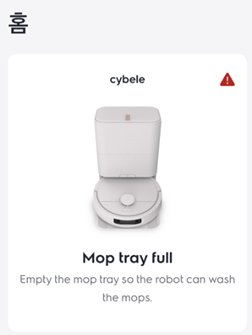
During the mop cleaning process if the App displays – mop tray full or you hear the robot voice prompt - Pump error, check mop washing tray and remove obstruction.
Applies to
- EFR81223
Solution
Check mop cleaning tray and remove obstruction to ensure the drain functions correctly.
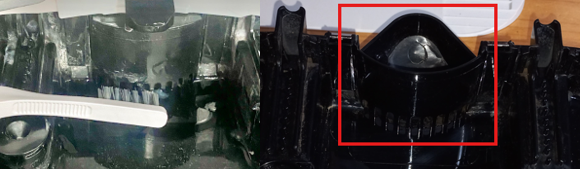
There is a drain hole at the bottom of the mop tray, and when this hole is clogged with debris, the “mop tray full” error occurs.
Use a small soft brush to clear and blockages whilst the tray is still in place in the station and return robot to station.
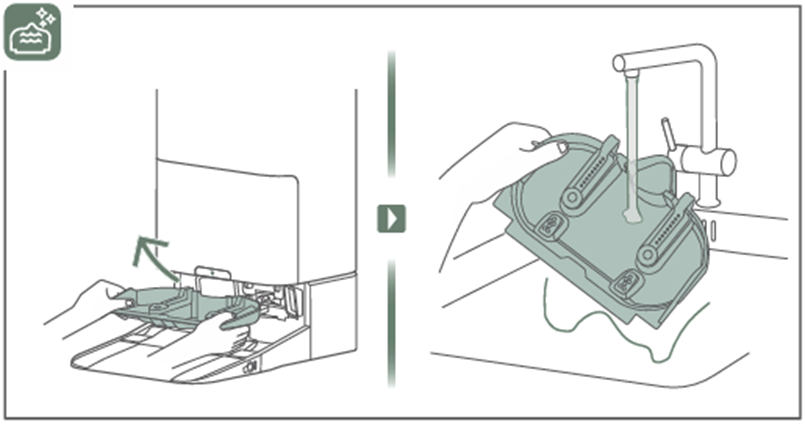
If this does not clear the fault or you are unable to remove the obstruction, then it will be necessary to dry and remove the tray and clean.
To remove the cleaning tray - Lift the try from the base station and clean.
For all cleaning and maintenance instructions please refer to the product user manual
Electrolux user manual
For replacement filters, dust bags, mop pads, brush rollers and side brushes please visit our Webshop.
Was this article helpful?
Related Articles
- The vacuum cleaner stops
- Cannot use app features - UltimateHome 700 Robotic Vacuum + Mop
- Not Emptying into the Dust Bag – UltimateHome 700 Robotic Vacuum- Mop
- Empty Station Dustbin troubleshooting - UltimateHome 800 Cordless Handstick Vacuum with Clean Station
- Stick vacuum cleaner has reduced or no suction power
- Power display (3 LED lights) flash three times before turning off - UltimateHome 700 Wet & Dry Vacuum
- Wi-fi Onboarding and Loss of Connection – Trouble shooting Robot Vacuum
- Electrolux | UltimateHome 300 robot vacuum How to set up video
- What can I do if the robotic vacuum wheel(s) is stopped?
- What can I do if the robotic vacuum's bumper gets stuck - Pure I9
Related Articles
- The vacuum cleaner stops
- Cannot use app features - UltimateHome 700 Robotic Vacuum + Mop
- Not Emptying into the Dust Bag – UltimateHome 700 Robotic Vacuum- Mop
- Empty Station Dustbin troubleshooting - UltimateHome 800 Cordless Handstick Vacuum with Clean Station
- Stick vacuum cleaner has reduced or no suction power
- Power display (3 LED lights) flash three times before turning off - UltimateHome 700 Wet & Dry Vacuum
- Wi-fi Onboarding and Loss of Connection – Trouble shooting Robot Vacuum
- Electrolux | UltimateHome 300 robot vacuum How to set up video
- What can I do if the robotic vacuum wheel(s) is stopped?
- What can I do if the robotic vacuum's bumper gets stuck - Pure I9