How often should I clean the robotic vacuum's dust bin Pure I9
Issue
- How often should I clean the robotic vacuum cleaner's dust bin?
Applies to
- Robot Vacuum
- Pure i9
- PI91-5SGM
- PI92-6STN
- PI92-6SGMKIT
Solution
1. Empty the robotic vacuum's dust container regularly to get the most out of scheduled cleaning.
- We recommend after each cleaning cycle.
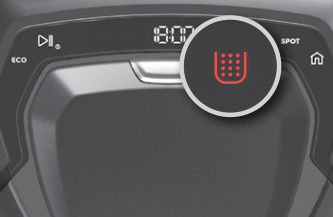
- If cleaning is urgently needed, the dust container icon will light up.
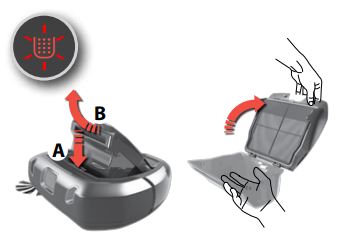
Emptying Dustbin
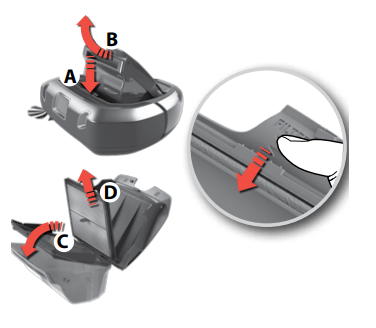
- Press Release button (A)
- remove the Dust container by swinging it upwards (B).
- Open the lid by swinging it upwards.
- Empty the dust container into a waste bin.
- Note: The dust container icon flashes to indicate that the Dust container has been removed or is not in the right position.
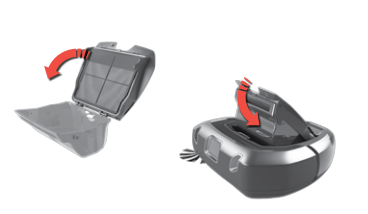
After emptying the container,
- Close the lid and put it back in place Refit the Dust container in the robot.
- Note: If the Dust container has not been properly assembled and Play/Pause button is pressed, the dust container icon flashes.
- Refit the Dust container properly.
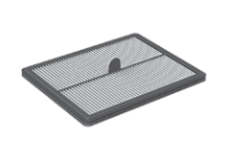
Dust Container Filter
- For best performance, we recommend cleaning the filter every 5th cleaning and to replace it every 6 months.
Remove the filter
- Remove the Dust container by swinging it upwards (B).
- Open the lid by swinging it upwards.
- Swing the Filter frame downwards (C).
- Remove the filter (D)
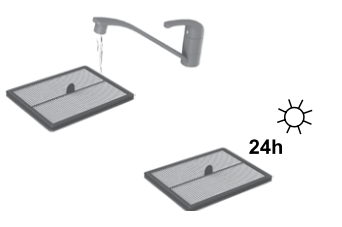
- Rinse the filter with cold water.
- Tap the filter frame to remove water.
- Let dry for 24 hours before placing it back in the machine.
For more information consult your user manual.
Electrolux User Manual
To purchase replacement accessories, please visit the Electrolux Webshop
Was this article helpful?
Related Articles
- The vacuum cleaner stops
- Cannot use app features - UltimateHome 700 Robotic Vacuum + Mop
- Not Emptying into the Dust Bag – UltimateHome 700 Robotic Vacuum- Mop
- Empty Station Dustbin troubleshooting - UltimateHome 800 Cordless Handstick Vacuum with Clean Station
- Stick vacuum cleaner has reduced or no suction power
- Power display (3 LED lights) flash three times before turning off - UltimateHome 700 Wet & Dry Vacuum
- Wi-fi Onboarding and Loss of Connection – Trouble shooting Robot Vacuum
- Electrolux | UltimateHome 300 robot vacuum How to set up video
- What can I do if the robotic vacuum wheel(s) is stopped?
- What can I do if the robotic vacuum's bumper gets stuck - Pure I9
Related Articles
- The vacuum cleaner stops
- Cannot use app features - UltimateHome 700 Robotic Vacuum + Mop
- Not Emptying into the Dust Bag – UltimateHome 700 Robotic Vacuum- Mop
- Empty Station Dustbin troubleshooting - UltimateHome 800 Cordless Handstick Vacuum with Clean Station
- Stick vacuum cleaner has reduced or no suction power
- Power display (3 LED lights) flash three times before turning off - UltimateHome 700 Wet & Dry Vacuum
- Wi-fi Onboarding and Loss of Connection – Trouble shooting Robot Vacuum
- Electrolux | UltimateHome 300 robot vacuum How to set up video
- What can I do if the robotic vacuum wheel(s) is stopped?
- What can I do if the robotic vacuum's bumper gets stuck - Pure I9