dE showing in the display and the cooling system is off lights working - activate/deactivate Demo Mode - Westinghouse
Issue
dE on the display
Cooling system is off
lights are working
fridge is in Demo mode
Applies to
- WQE5700BD
- WQE5760BB
- WQE5750BB
Solution
dE - Demo Mode
The purpose of Demo Mode it to for retailer showroom display models to demonstrate the user interface and refrigerator features.
When in Demo Mode the user interface and the internal lights will operate normally, but the cooling system will be turned off.
Demo Mode
dE fridge display and On freezer display when activated.
Activating Demo Mode
Press and hold Fridge & Freezer display area for 10 seconds
In the display All LEDSs turn off to 0% except for:
- Fridge boost LED indicator
- Freezer boost LED indicator
The above 2 indicators continuously pulse for 100% to 0% in 1 second.
Blink ‘dE’ on the fridge display and ‘On’ on freezer display twice and whenever the door is opened, then display returns to wake-up mode.
Deactivating Demo Mode
Press and hold Fridge & Freezer display area for 10 seconds
In the display All LEDSs turn off to 0% except for:
- Fridge boost LED indicator
- Freezer boost LED indicator
The above 2 indicators continuously pulse for 100% to 0% in 1 second.
Fridge display will flash ‘De’ and freezer display will flash ‘Of’ for 2 seconds, and the user interface display LED returns to previously set state.
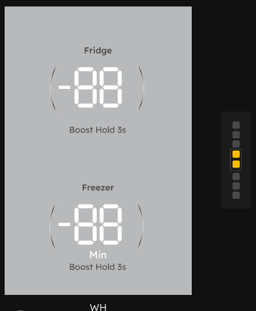
Powering off the fridge at any time will deactivate demo mode and return to normal mode
If Demo mode has activated by itself , check that the protective film on the UI has been removed this has been known to change setting
Cause
If Demo mode has activated by itself , check that the protective film on the UI has been removed this has been known to change setting
Was this article helpful?
Related Articles
- Ice cubes are freezing together or hollow
- Ice maker is not making any ice
- Ice dispenser is jammed.
- Dispensed Water has an odd taste and/or odour.
- How to Align and level the cabinet and doors of your Electrolux French Door refrigerator
- Dispenser (Ice & water) Water not cold enough
- How to Video "Change Air filter, Air filter alarm, Air filter reset"
- Dispenser (Ice & water) not dispensing water
- Unusually small ice cubes from ice dispenser
- The door of my fridge/freezer is not closing properly