How to change temp display for Celsius / Farenheight
Issue
How to change temp display for Celsius or Farenheight
Applies to
- Refrigeration - Electronic Control Display Models
Solution
External Electronic Control Display
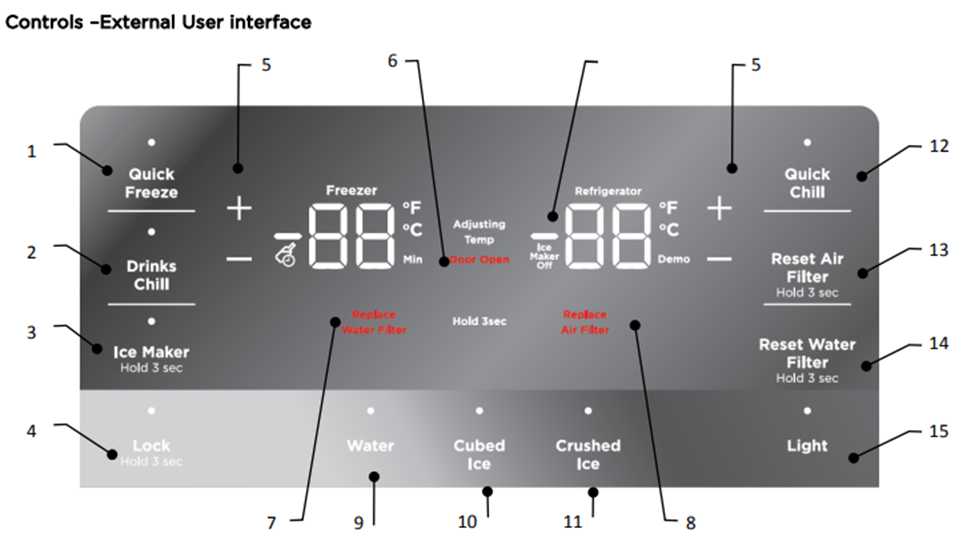
Press and hold for 5 seconds + and - on the refrigerator side. A tone will be heard. The display will then revert to either °F or °C mode
Internal Electronic Control Display
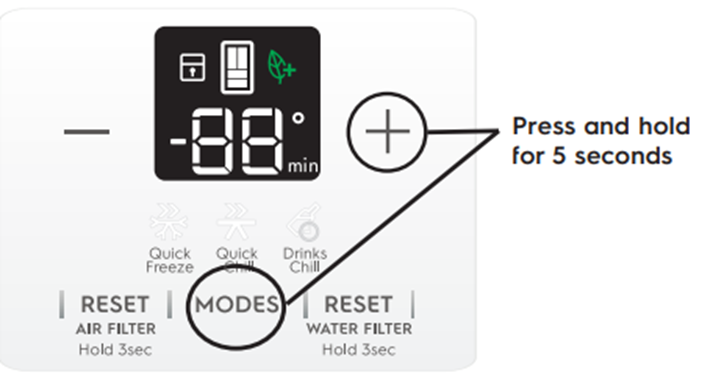
Press and hold for 5 seconds “+” and “Mode” Buttons
The display will change to “°F or °C”
Was this article helpful?
Related Articles
- Temperature in the refrigerator is too low, freezing in the crisper bins
- Ice maker is not making any ice
- How to remove/replace the auto humidity control drawer with membrane
- The fridge is beeping and door alarm is on the display
- Door light not functioning correctly – Vintec Wine cabinet
- The LED lighting not working or dim in my fridge-freezer
- CE on the display and cannot adjust the temp settings - Vintec Wine Cooler
- How to Video "Change Air filter, Air filter alarm, Air filter reset"
- Filter alert message - Vintec
- VCZ Too cold freezing on fridge/wine Settings EHE6191BB "MULTI SWITCH DRAWER"
Related Articles
- Temperature in the refrigerator is too low, freezing in the crisper bins
- Ice maker is not making any ice
- How to remove/replace the auto humidity control drawer with membrane
- The fridge is beeping and door alarm is on the display
- Door light not functioning correctly – Vintec Wine cabinet
- The LED lighting not working or dim in my fridge-freezer
- CE on the display and cannot adjust the temp settings - Vintec Wine Cooler
- How to Video "Change Air filter, Air filter alarm, Air filter reset"
- Filter alert message - Vintec
- VCZ Too cold freezing on fridge/wine Settings EHE6191BB "MULTI SWITCH DRAWER"