Electrolux Quad Door Refrigeration | How to change the water filter Video
Issue
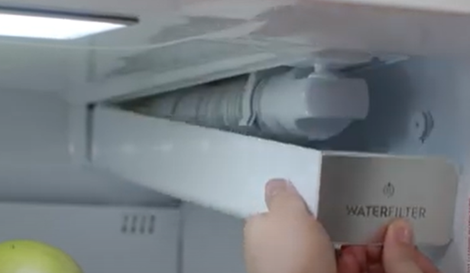
How to change the water filter
Applies to
- Quad Door Refrigerator
Solution
Your refrigerator is equipped with a water filtering system.
The water filtering system filters all dispensed drinking water, as well as the water used to produce ice.
The water filter is located at the top right side of the fresh food compartment. In general, you should change the water filter every six months to ensure the highest possible water quality.
Water filter status on the user interface prompts you to replace the filter after a standard amount of water (750 litres) has flowed through the system.
If your refrigerator has not been used for a period of time (during moving for example), change the filter before reinstalling the refrigerator
Note: When ordering your replacement filter, please reorder the same filter type that is currently in your refrigerator.
- Ensure that the ice maker is turned off when replacing water filter
Was this article helpful?
Related Articles
- Ice maker is not making any ice
- Temperature Issues Troubleshooting - Refrigeration
- Fridge operating sounds
- How to Video "Change Air filter, Air filter alarm, Air filter reset"
- The fridge is beeping and door alarm is on the display
- My fridge or freezer door is difficult to open
- User interface display beeping or changing settings randomly
- Appliance does not operate at desired temperature
- How to change temp display for Celsius / Farenheight
- AI Cool Assist – Auto Sense Setting