Stains or marks on SaphirMatt cooktop – Cleaning advice
Issue
SaphirMatt Cooktop cleaning instruction
Applies to
- Cooktop
Solution
Cleaning instruction for stubborn stains or other discolorations on cooktop glass.
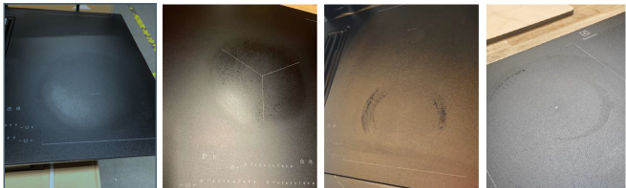
Burned-in residues:
Use a scraper to remove burned-in residues before cleaning.
Use the scraper at a flat angle.
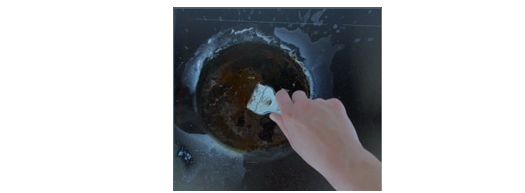
Cleaning process
Use a mildly abrasive cream cleaner: Jiff, ajax or similar cream surface cleaners.
Standard ceramic glass cleaner might not be strong enough to remove heavy stains.
Spread the cream cleaner over the surface until it is slightly foaming and let it soak in for at least 5 minutes.
Use a sponge with a mildly abrasive scouring pad. These sponges are usually described as non-scratching. The colour of the scouring pad is usually blue.
Do not use the classic yellow/green abrasive sponges. The green side can cause scratches.
Apply moderate pressure and scrub the glass in circular movements for several minutes.
Afterwards wipe the glass with a wet cloth to remove the residuals of the cream cleaner and dry wipe with a soft cloth.
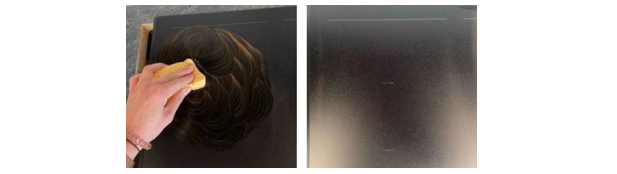
The process needs to be repeated several times until the stains are removed.
NOTE: This cleaning method is only valid for SaphirMatt glass and not for standard ceramic hob glasses. If the hob has side trims (frame), do not use this method for the side trims.
General care and maintenance
- Clean the appliance regularly to prevent the deterioration of the surface material.
- Clean the hob after each use.
- Always use cookware with a clean base
Was this article helpful?
Related Articles
- How To Assemble The Telescopic Runners In Your Electrolux Oven
- How to use the SenseFry function on your Electrolux Induction cooktop
- Oven displays error F101 or F102
- The Hob2Hood function does not work with the cooker hood
- How to use Pyrolytic Cleaning on your Electrolux oven
- How to set or adjust the clock - Electrolux oven
- Discoloured marks or bubbles ceramic glass cleaning tips
- How to change and maintain your Electrolux Rangehood filter - Long life filter
- Carbon Filters How often should you replace them
- Hob displays message A
Related Articles
- How To Assemble The Telescopic Runners In Your Electrolux Oven
- How to use the SenseFry function on your Electrolux Induction cooktop
- Oven displays error F101 or F102
- The Hob2Hood function does not work with the cooker hood
- How to use Pyrolytic Cleaning on your Electrolux oven
- How to set or adjust the clock - Electrolux oven
- Discoloured marks or bubbles ceramic glass cleaning tips
- How to change and maintain your Electrolux Rangehood filter - Long life filter
- Carbon Filters How often should you replace them
- Hob displays message A